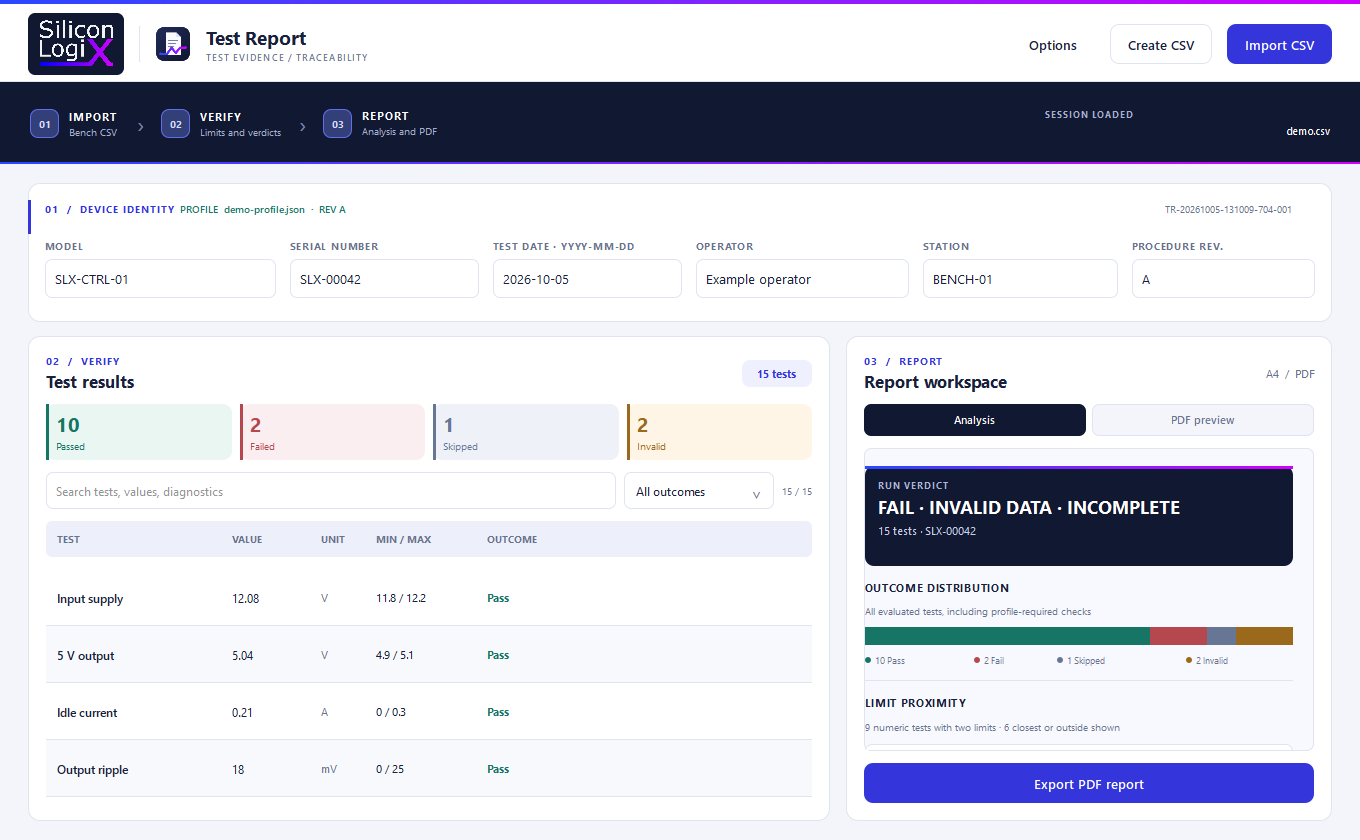
SLX Test Report is now available on GitHub. This Silicon LogiX desktop application turns electronic test results into traceable PDF reports. It works with CSV exports from the test bench, without requiring a direct connection to the instruments.
The project addresses a practical need: collecting measurements, checking them against acceptance criteria and keeping them in a document that can be reviewed. The release lets you explore this workflow through the application, source code and supplied examples.
From measurements to reports
The workflow has three steps: import, verify and generate the report. The software compares measurements with acceptance limits, handles functional checks and distinguishes passed, failed and skipped tests from invalid data. Search, filters and an analysis view help identify anomalies and readings close to their limits.
Alongside file import, a visual editor lets you prepare CSV files directly in the application. When a file contains several serial numbers, results are grouped by device, with the option to export one PDF for each unit.
JSON test profiles define the model, revision, expected checks and their limits. They keep acceptance criteria separate from the collected measurements and allow the software to highlight missing required tests, duplicates and tests outside the profile.
Test traceability
Each report includes measurements, units, limits, outcomes and diagnostics, together with the model, serial number, date, operator, station and procedure revision. A report ID identifies the document, while a SHA-256 digest links it to the original CSV and, when used, the test profile.
The PDF is laid out on A4 pages and retains anomalous and incomplete results. An appendix preserves full test names and diagnostic notes when the compact table cannot display them in full.
The technologies behind the project
The project is built with C++17 and Qt 6. Its interface uses Qt Quick, QML and Qt Quick Controls, while C++ modules handle data reading, result evaluation and reporting. This structure separates test logic from the presentation of results, as shown in the project configuration.
CSV and JSON are the exchange formats for measurements and profiles. For PDF generation, the software uses Qt's QPdfWriter and QPainter: tables, summaries and graphics are composed directly by the application. The output file is committed only after generation has finished.
CMake coordinates compilation and CTest runs the tests, which cover CSV handling, profiles, filters and the reporting workflow. The repository also includes a GitHub Actions workflow to build the project and run checks on Windows.
How to try it
Release v0.5.2 includes a Windows package that you can extract and run, with example data to explore the workflow and produce a first report. The GitHub repository provides source code, screenshots and documentation, including instructions for building the application.
The project is distributed under the Silicon LogiX Evaluation License, which permits study and evaluation; commercial use requires written permission.
Custom software for testing and reporting
Need an application to manage test data, automate reports or connect software you already use? Silicon LogiX provides custom software development for businesses: desktop and web applications, data analysis tools and integrations with existing systems.
Contact us about your software project: describe the process you want to improve, the data available and the functions you need. Together, we can assess the requirements and the first step towards implementation.