The board has not arrived, but firmware development needs to move forward. Perhaps the PCB is being revised, several engineers share the first prototypes, or a regression is difficult to isolate. Running selected checks on a development computer helps separate software problems from hardware issues.
Zephyr and Espressif’s QEMU fork provide a way to execute firmware for supported ESP32 targets in an emulated environment. The value is earlier, repeatable verification. To interpret the results correctly, engineers need to understand which parts of the device are modeled and which tests still require real hardware.
The starting point is Espressif’s guide published on September 15, 2026, covering Zephyr startup and debugging with QEMU. For product development, the useful idea is to establish an observable software baseline before validating it on the physical board.
How ESP32 emulation with Zephyr and QEMU works
Three components have distinct roles. Zephyr provides the operating system and application environment. The toolchain compiles sources for the target architecture. QEMU executes that code against a software model of the machine on the development computer.
A debugger can pause execution, inspect memory and registers, and follow a program path. The connection uses the remote debugging mechanism described in the QEMU GDB documentation. This emulated debugging session does not need a physical probe attached to a board.
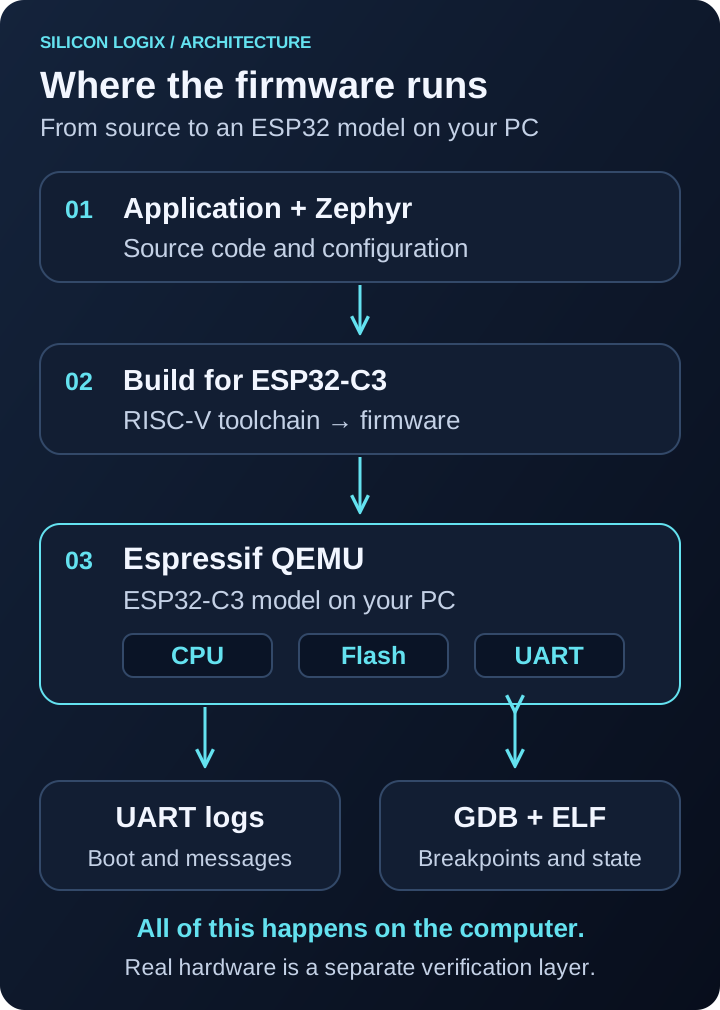
This distinction determines what a result means. Reaching an expected execution point verifies one path in that configuration. It does not establish how a power rail will respond to a current spike or how long a transmission will take at the installation site.
Supported ESP32 targets: what to check first
The Zephyr documentation for Espressif QEMU lists the following combinations. Check that the required board variant exists in your Zephyr revision before configuring the build.
| SoC | Architecture | QEMU executable |
|---|---|---|
| ESP32 | Xtensa | qemu-system-xtensa |
| ESP32-S3 | Xtensa | qemu-system-xtensa |
| ESP32-C3 | RISC-V | qemu-system-riscv32 |
| ESP32-C6 | RISC-V | qemu-system-riscv32 with the C6 machine available |
ESP32-C6 needs an additional check: the prebuilt esp-develop-9.2.2-20260417 release referenced by the documentation does not include that machine; the documented route is to build from esp-develop. For later packages, inspect the official releases and the machines listed by the installed executable.
What emulation can verify, and what remains outside it
The Espressif QEMU feature matrix identifies modeled peripherals. Coverage differs between SoCs; the ESP32 family name alone does not establish compatibility. Wi-Fi and Bluetooth are not emulated, and many external sensor and device interfaces are also outside the model.
The matrix also describes additional virtual peripherals for particular uses, including emulated Ethernet. A virtual network path does not validate the product’s Wi-Fi connection: association, antenna behavior, interference and coverage need their own tests.
Choose tests by asking a precise question. “Does the parser reject an incomplete message?” differs from “Does the sensor respond correctly on the bus?” Controlled inputs can exercise the first case. The second also depends on the driver, peripheral model and, ultimately, the physical connection.
A first ESP32-C3 boot: where to begin
Start with a working Zephyr workspace, SDK, Espressif dependencies and a revision containing the required QEMU target. The Zephyr getting started guide covers environment setup. Install the emulator separately from Espressif’s releases.
Before building, check that the executable selected by your shell knows the required machine:
qemu-system-riscv32 -machine helpThe list should include esp32c3. If it does not, check the executable path and version. A compiler and an emulator serve different purposes: installing the former does not add a chip model to the latter.
The following is a documentation-based reference sequence, run from the workspace root containing zephyr/. It is not presented as a laboratory measurement:
west build \
  -b esp32c3_devkitc/esp32c3/qemu \
  zephyr/samples/hello_world \
  -d build-qemu-c3 --no-sysbuild --pristine

west build -d build-qemu-c3 -t run
The /qemu variant selects the emulation configuration. The initial check is to observe startup and the sample’s message. That establishes a starting point, rather than validating a complete application.
The west build documentation explains build directories and --pristine, which recreates the contents of the build directory. Use a dedicated folder and keep source files and documents elsewhere. A clean build helps avoid stale settings when changing targets or configurations.
For debugging, Espressif’s workflow uses the debugserver target and GDB for the correct architecture. The zephyr.elf file must match the running build: symbols from another compilation can make an investigation misleading.
A practical design example: verifying alarm handling
Consider a device that reads a temperature, activates an alarm above a threshold and clears it below a second threshold. Hysteresis prevents repeated switching near the limit. Several software decisions can be checked before introducing the sensor.
Separate measurement acquisition from the function that updates the alarm state. A test supplies a known sequence: a normal value, a threshold crossing, an intermediate fluctuation and a return below the clearing threshold. At each step, compare the actual state with the expected state. Then add invalid readings, stale measurements and inconsistent configuration.
Synthetic inputs verify the logic that receives them. They do not demonstrate that an I2C sensor works inside QEMU. This separation makes it possible to identify a hysteresis bug independently of wiring. Once the board arrives, testing also covers acquisition, timing and driver error handling.
A useful report names the verified requirement. “Alarm active after a valid reading above the threshold” communicates evidence; “test OK” alone does not explain coverage or limitations. Repeating the sequence after adding a new sensor helps detect regressions in the application rules.
Logic tests, QEMU and physical hardware: complementary layers
A product needs different checks with specific objectives. Logic tests investigate decisions. Emulation exercises parts of firmware integration. Device tests establish properties that exist only in physical hardware and its operating environment.
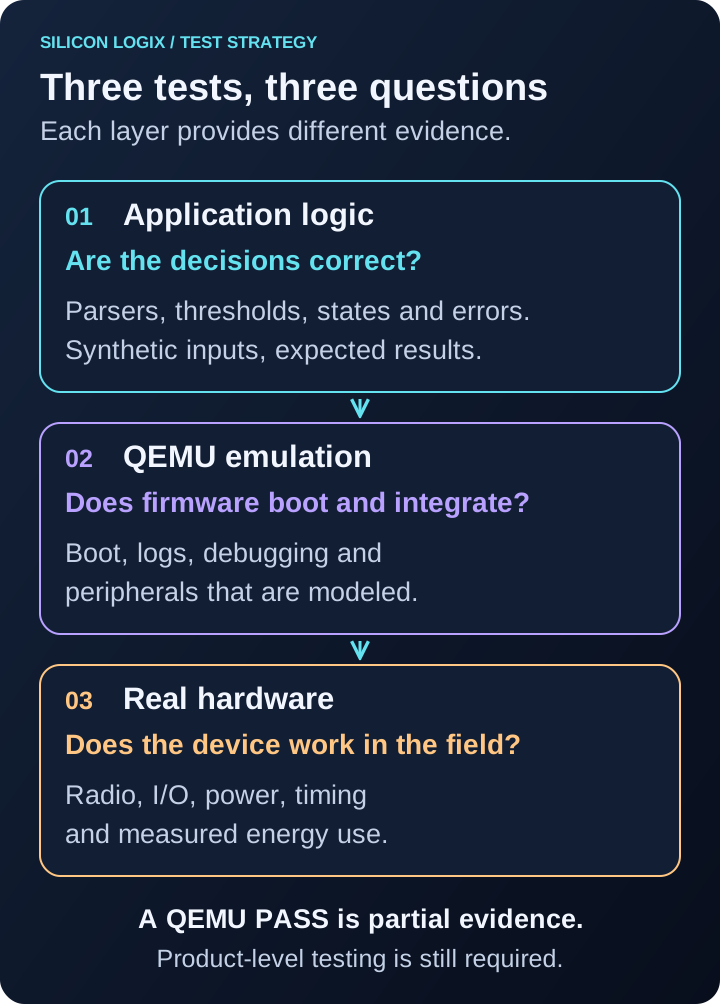
Zephyr provides Ztest for organizing tests and assertions. Its native_sim platform also runs Zephyr applications compiled for the host. That is a different environment from ESP32 emulation and can be useful for software logic and integration that do not require a model of that SoC.
For an automated pipeline, record the code revision, configuration, tool versions and expected outcome for every run. A job should distinguish an application failure, a timeout and an environment startup problem. Otherwise, process termination can be mistaken for a successful test.
Start with a few checks tied to costly defects: invalid configuration, incomplete messages, a full queue or recovery after an error. Evaluate the benefit by tracking which defects are caught earlier and which still need reproduction on the board. There is no universal percentage of time saved.
ESP32, Zephyr and QEMU: frequently asked questions
Can QEMU verify ESP32 Wi-Fi and Bluetooth?
Those radios are not emulated in the workflow described here. Their operation and performance require real hardware. A virtual network interface does not constitute a radio test.
Can I reuse the production configuration automatically?
Check its peripheral dependencies first. Applications that initialize unmodeled components may need a test configuration or replaceable interfaces. Document the differences from production firmware.
Is a passing QEMU test enough to release firmware?
It is one part of the evidence. Release criteria must address the product, including board integration, error handling and the intended operating conditions.
Making verification part of firmware development
A practical first step is to identify a critical software module and the behavior that must remain stable. Build repeatable tests around those requirements, choose where to run them, and connect the results to device-level verification.
Silicon LogiX provides ESP32 firmware development, system integration and firmware debugging support. To discuss verification for your product, describe the device, the current software and the problem you need to solve.
Related reading: FreeRTOS, Zephyr and ThreadX compared, ESP32 with Wi-Fi, REST APIs and a web UI, and diagnosing embedded resets in the field.
Technical references checked on September 29, 2026. Diagrams are original explanatory illustrations; the alarm scenario is a design example. Check commands and compatibility against your installed versions.