The charger has ample rated power, the car is connected and the session is authorized. Yet charging slows down. The cause may lie in the battery, cooling system, cable or power available across the site. For engineers developing a BMS, charging station or fleet application, the useful question is specific: which constraint is limiting power, and will the vehicle be ready at departure?
I built SLX ChargeProof to explore that relationship in a desktop laboratory: change a condition, observe the system response and retain readable evidence. The project combines a C++20 electrothermal model, local OCPP 2.0.1 communication over WebSocket, an OpenGL 3D campus and tools for diagnosis, recording and replay. The Windows preview is available on GitHub. Batteries and chargers are simulated; the software and message exchanges run on the PC.
Why EV charging slows down
The kilowatt rating on a charger describes an infrastructure capability, not a power level guaranteed throughout a session. The Battery Management System, or BMS, determines acceptable charging conditions for the pack. The station must also respect its electrical limits, the connection limits and any power budget shared with other loads.
Understanding charging time requires distinguishing power, measured in kW, from energy, measured in kWh. Consider a simplified example: a battery with 75 kWh of usable capacity needs approximately 45 kWh to move from 20% to 80%. At an average power of 90 kW actually stored in the battery, that would take 30 minutes. An instantaneous peak of 180 kW does not, by itself, halve the estimate: what matters is the power sustained over the session.
Indicative time [h] = energy to store [kWh] / average stored power [kW]
This is an approximate calculation assuming constant usable capacity. If using grid input power instead, conversion losses and auxiliary loads must be accounted for. The US Department of Energy’s Alternative Fuels Data Center identifies capacity, state of charge, the vehicle and charging equipment among the factors that determine duration.
State of charge, or SOC, and temperature change during charging. As cells approach their voltage limits, current must decrease. A battery that is too cold or too hot may lead the controller to reduce its request further. The slower phase does not begin at a universal percentage: it depends on the pack and manufacturer’s strategy. A falling power curve can therefore indicate expected operation or a fault that needs diagnosis.
AC and DC charging: where conversion happens
A battery charges with direct current. In AC charging, conversion from alternating current takes place in the vehicle’s On-Board Charger, or OBC. In DC charging, the main conversion happens outside the vehicle. Texas Instruments’ technical documentation on EVs and EVSE explains this distinction and the role of communication between the vehicle and infrastructure.
| Aspect | AC charging | DC charging |
|---|---|---|
| Main AC/DC conversion | On-board vehicle charger | Power electronics outside the vehicle |
| A constraint to check | OBC capability and available supply | Station, cable and battery voltage/current operating ranges |
| Application context | Dwell times compatible with OBC power | Sessions requiring higher power, within system limits |
Voltage has practical consequences too. In an ideal comparison at 200 kW, 400 V requires 500 A and 800 V requires 250 A. With the same resistance in the conductor being considered, halving current reduces its I²R losses to one quarter. This does not imply that all vehicle losses fall by the same amount: components, conversion stages, insulation and operating conditions also change.
The Combined Charging System, CCS, concerns charging interfaces and their interoperability. OCPP addresses a different software connection. Recognizing these layers prevents attributing charger or vehicle functions to the wrong protocol.
BMS and electrothermal modeling: connecting current, SOC and temperature
In a real system, the BMS collects voltage, current and temperature measurements, estimates states such as SOC, and applies protection and operating limits. A sensor reading does not automatically represent every point in the pack. A measurement that appears valid can still be unrepresentative, offset or stuck.
ChargeProof makes these relationships observable through a Thevenin equivalent circuit: an SOC-dependent open-circuit voltage, resistance and an RC branch for transient response. The model updates charge, polarization and thermal behavior at a fixed step of 0.5 virtual seconds. The PyBaMM Thevenin model documentation provides a reference for this type of formulation. PyBaMM is not a runtime dependency of ChargeProof.
The preview offers three synthetic profiles: a compact LFP vehicle, an 800 V-class NMC SUV and an LFP van. They are declared engineering assumptions for comparing behavior and constraints, not data from commercial vehicle models. Two representative aggregates separate the main pack population from a weak block. The many cells visible in the scene do not each have an independent thermal model.
This design exposes a clear causal chain: cooling changes, calculated temperature changes, accepted current changes, and the energy that can be stored before departure changes. DOE research on fast-charging technology gaps illustrates the interaction between transport, temperature and electrochemical processes. The demonstrator simplifies those processes and does not calculate electrochemical cell degradation.
OCPP, ISO 15118 and Plug & Charge serve different roles
OCPP connects a charging station to its Charging Station Management System, or CSMS. The ISO 15118 family addresses communication between the vehicle and EVSE, the equipment supplying energy to the vehicle. Keeping those two connections separate is essential when designing authorization, control and diagnostics.
| Layer | Purpose | In this preview |
|---|---|---|
| Vehicle / BMS | Charging request and battery limits | Numerical emulation with synthetic profiles |
| Vehicle ↔ EVSE | Charging communication, including ISO 15118 | No ISO 15118 stack |
| EVSE ↔ CSMS | OCPP authorization, status and transactions | OCPP 2.0.1 subset over local WebSocket |
| Plug & Charge | Automatic identification using certificates and a trust infrastructure | Not implemented |
In the laboratory, the station client and local server actually exchange JSON messages: BootNotification, Heartbeat, Authorize, StatusNotification and TransactionEvent, with meter values included in transaction events. Requests and responses can be retained and associated with their session. An OCPP authorization message is not a Plug & Charge procedure.
As CharIN explains in its Plug & Charge overview, automated identification involves standardized interfaces and security mechanisms. A working integration must handle certificates, trust chains and credential lifecycles. The preview includes neither this PKI nor a TLS connection to an external backend: its evaluation CSMS listens only on the PC’s loopback interface.
The Open Charge Alliance documents OCPP 1.6, 2.0.1 and 2.1 and their functions. ChargeProof uses the 2.0.1 subset described in its protocol coverage documentation. It does not claim a complete standard implementation or OCA certification.
Smart charging: site power limits and departure times
At a depot with several vehicles, sessions compete for a shared resource. The sum of charger ratings may exceed the power that the grid connection can supply. Battery requests, station availability and auxiliary loads must therefore be coordinated.
ChargeProof distinguishes the EV/BMS request, station command and power actually delivered. These quantities can differ. A BMS may accept substantial power while the site allocates less; a station may receive a high command while a cable limit imposes a reduction. Once expressed at the same electrical boundary, applied power must remain within every constraint.
The demonstration controller uses max-min fair allocation: it shares the available budget among admissible requests and redistributes unused allocations. Conversion and auxiliary loads are accounted for before assigning DC power. This is not an economic fleet optimizer: tariffs, real duty cycles, photovoltaics and active battery storage require a dedicated project.
The departure forecast adds an operational question to instantaneous power. It runs an isolated copy of the model while holding current assumptions about faults, authorization, ambient conditions and site budget constant. It describes what would happen if those conditions persisted; it does not anticipate a recovery action that the operator has not yet performed.
ChargeProof’s technology: C++20, OCPP and native graphics
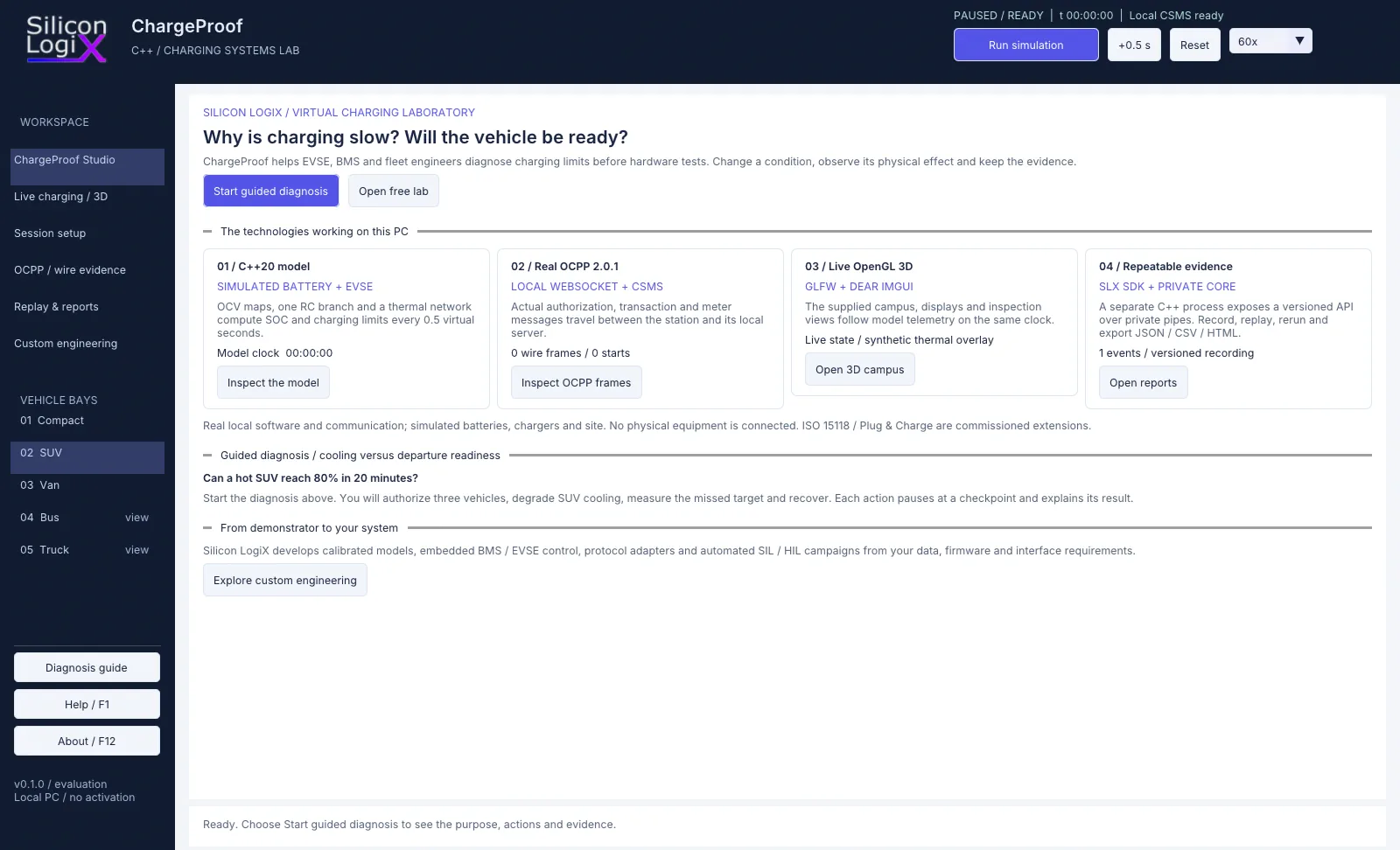
The opening ChargeProof Studio page presents the four software layers and connects each to an observable check. The 3D scene, messages and reports refer to the same session. Users can move from “why is charging slowing down?” to the numerical constraint and its recorded evidence.
- C++20 core and versioned SDK. Computation runs in a separate process connected to the desktop through private pipes. The same core supports interactive sessions and headless scenarios.
- GLFW, Dear ImGui docking and OpenGL 3.3. GLFW manages the window and graphics context; Dear ImGui builds the technical panels; OpenGL renders the campus, inspection views and live displays. The application is a native C++ desktop.
- OCPP 2.0.1 and WebSocket. A WinHTTP client and WinSock server perform the local exchange, making the actual transmitted messages available for inspection.
- Recordings and reports. Events, inputs, states and results remain associated with a session, with HTML, JSON and CSV exports for analysis and comparison.
The campus has five inspectable bays. Three have operational electrical profiles; the bus and truck are inspection geometries. Visualization helps locate what is being observed, while the model documentation explains which states are actually calculated.
An experiment: from a 72% forecast to an observed 80%
The guided diagnosis starts with a synthetic SUV at 25% SOC and 48 °C, targeting 80% after twenty virtual minutes, with a 500 kW site AC limit shared by the enabled sessions. These values define a demonstration experiment, not operating instructions for a real battery.
Following authorization, the nominal forecast indicates that the target is reachable. The guide then introduces degraded cooling and keeps it active until the ten-minute checkpoint. The model reduces acceptable power and the departure forecast drops to approximately 72%. Restoring cooling brings the forecast back to 80%. The simulation continues and also retains the SOC actually integrated at departure.
| Diagnosis stage | Indication | Interpretation |
|---|---|---|
| Nominal conditions | 80.0% forecast | Target reachable if current conditions persist |
| Fault, at minute 10 | Approximately 72.0% forecast | Departure estimate if cooling remains degraded |
| After recovery | 80.0% forecast | Updated estimate with cooling restored |
| Departure, at minute 20 | 80.0% observed in the model | Result of the simulation that included recovery |
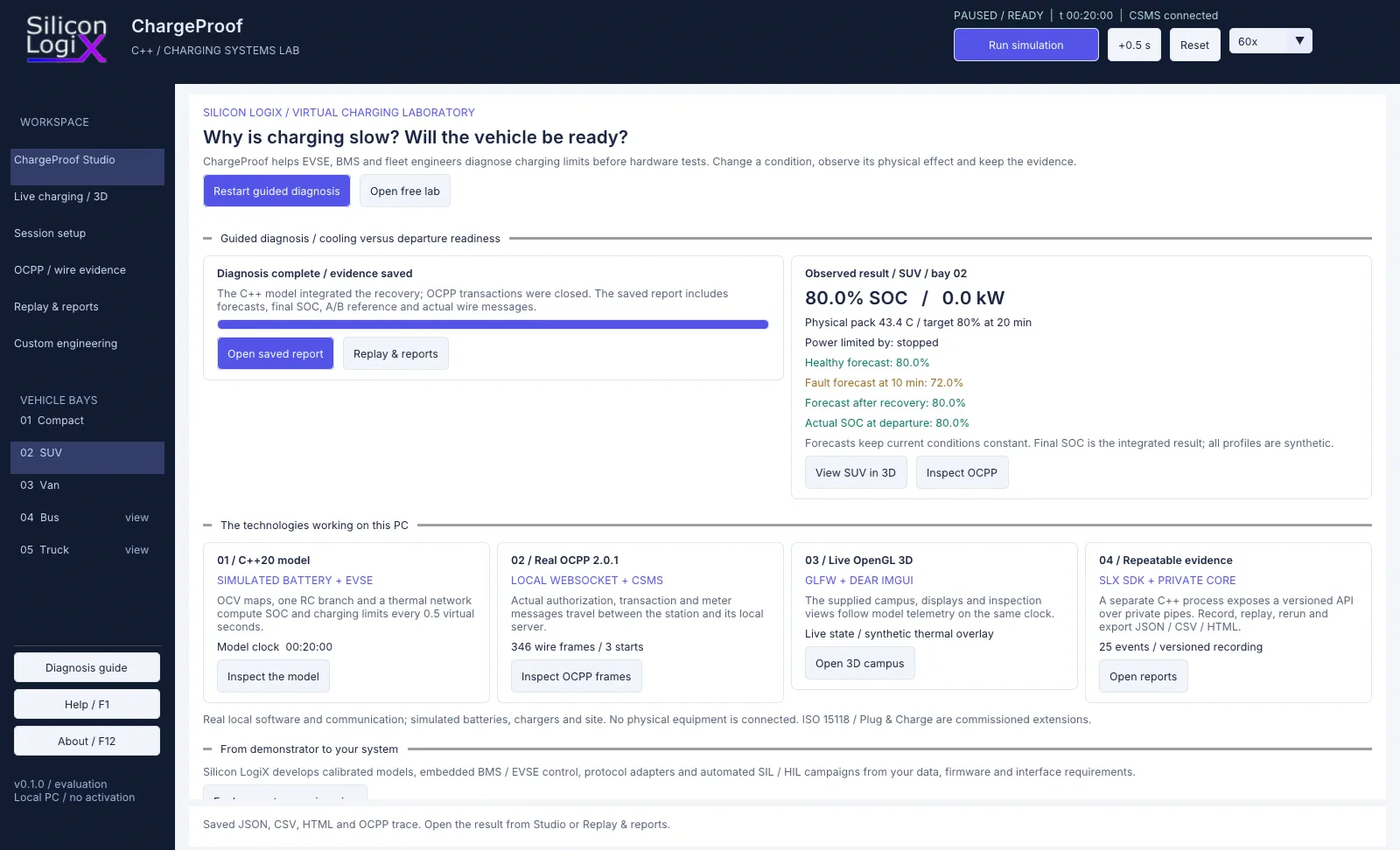
The useful comparison is between cause, consequence and intervention. The final 80% value alone would hide the problem encountered during the session; a cooling alarm alone would not quantify its effect on the departure target. Retaining both helps explain controller behavior and the timing of an effective recovery.
Faults, messages and energy accounting: interpreting the evidence
The preview includes backend loss, sensor offset, degraded cooling, reduced power-module output, a weak battery block and cable heating, plus a stuck-sensor variant. Each scenario exposes a different system boundary.
The sensor case separates calculated physical temperature from the value received by the controller: adding a measurement offset does not artificially change the thermal state. The backend scenario disconnects the actual local socket. Existing authorized transactions may continue under the demonstration policy, while new authorizations are rejected until recovery. Events are queued in memory for subsequent delivery; the queue is not persistent storage that survives a program crash.
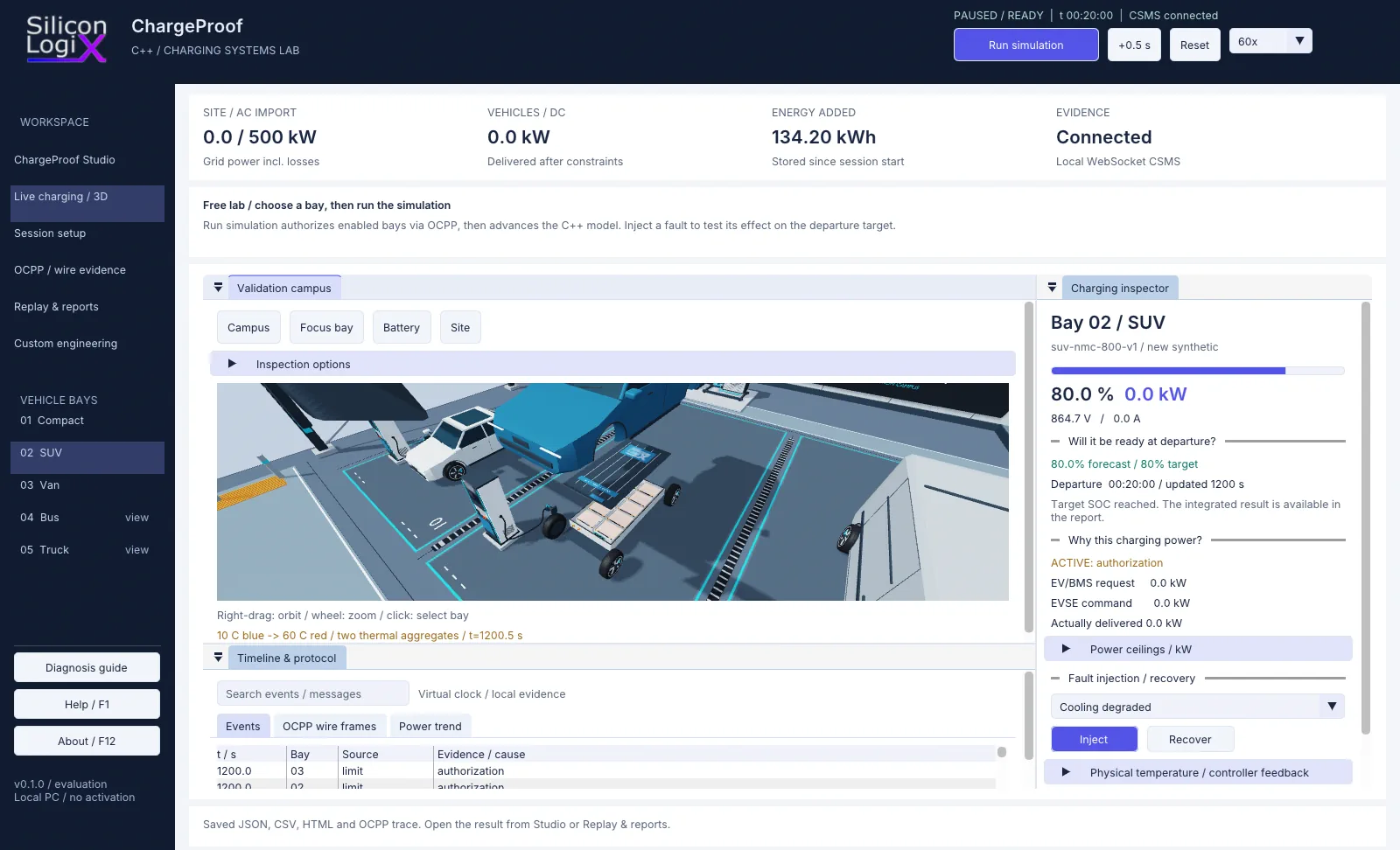
Energy accounting also requires clear boundaries. The software distinguishes AC input, DC pack-terminal energy, stored energy, losses and auxiliaries. The meter register carried in the demonstrator’s messages refers to the pack’s DC terminal and is not a revenue meter. Closing the energy ledger checks the model’s internal accounting; it does not demonstrate that its parameters describe a real battery.
The published version’s automated checks compiled the Windows desktop and ran seven headless scenarios, checking site constraints, energy balances and transaction lifecycles among other properties. The validation documentation describes the scope and limits of these checks.
Replay reads a recording without advancing the model or sending new messages. A new simulation recalculates behavior from its inputs. The included A/B comparison uses the same controller build and a fault-free baseline. Comparing two firmware versions would require a separate campaign retaining the respective binaries and configurations.
MCS and V2G require separate engineering work
Heavy-duty charging changes the scale of the problem: more energy to transfer, constrained dwell times and greater demands on conductors, contacts and cooling. The Megawatt Charging System, MCS, described by CharIN addresses interfaces for these applications. Increasing a kW setting in a simulator is not sufficient to represent those characteristics.
Vehicle-to-Grid, or V2G, adds energy transfer from the vehicle to the grid. ISO 15118-20:2022 also defines messages and sequences for bidirectional power transfer. Its 2026 amendment addresses additional services, including MCS and an updated security concept. Communication is one part of the design: bidirectional power electronics, control and grid-interface requirements must also be addressed.
These functions are not operational in the ChargeProof preview. The same applies to ISO 15118, Plug & Charge, OCPP 2.1 and external CSMS connections. Discussing them alongside the demonstrator places charging technology in context while keeping the executable scope clear.
How to try SLX ChargeProof on Windows
Open release 0.1.0-preview-r5 and download SLX-ChargeProof-0.1.0-preview-r5.zip. Extract the entire archive and start SLX-ChargeProof.exe, keeping the executable, assets, core and licenses together. Windows 10/11 x64 and an OpenGL 3.3 graphics driver are required. The release includes SHA-256 checksums and is an unsigned evaluation preview.
Choose Start guided diagnosis to follow the SUV scenario’s checkpoints. After the final result, open the report, inspect the messages or move to the free laboratory. The portable package requires no compiler, Python installation, account or charging hardware.
The public slx-chargeproof repository includes interface and adapter sources, the SDK and documentation. The proprietary numerical core is supplied as an evaluation binary. Terms are set out in the Silicon LogiX Evaluation License 1.0; third-party components retain their own licenses. Use the portable ZIP to run the application directly and the source archive to rebuild the interface.
From a virtual laboratory to a real charging system
ChargeProof supports discussions about architecture, diagnosis and test criteria before connecting a physical bench. A specific project needs cell and pack data, OCV and resistance curves across SOC and temperature, cooling-system characteristics, electrical limits and interface requirements. Comparison with measurements and tests in a defined operating envelope is necessary to qualify a model for that use.
These inputs support the development of BMS and EVSE firmware, protocol adapters, operator interfaces and software-in-the-loop or hardware-in-the-loop test campaigns, with explicit targets, clocks and acceptance criteria. A simulator using synthetic parameters does not replace electrical, thermal, interoperability or product-safety testing.
The approach is shared by SLX CellProof’s robotics laboratory and the industrial SLX GridPilot OPC UA laboratory: make behavior explorable and retain the link between inputs, events and outcomes. For a custom charging solution, the starting point is to define the problem to investigate and the available data with Silicon LogiX.
Frequently asked questions about EV charging simulation
Why does a car draw less than the charger’s rated power?
The rating is an infrastructure limit. The battery may request less current because of SOC, temperature or cell voltage. Cable, station and site limits may also intervene. ChargeProof separates request, command and delivered power so the active constraint can be observed in the model.
Are OCPP and ISO 15118 the same thing?
No. OCPP connects a station to its management system; ISO 15118 concerns communication between the vehicle and charging infrastructure. The preview executes an OCPP 2.0.1 subset locally and includes neither an ISO 15118 stack nor Plug & Charge.
Can I use ChargeProof without a vehicle or charging station?
Yes. The Windows preview runs on a PC with synthetic models and a local CSMS. The guided diagnosis demonstrates faults, forecasts and recovery without connected equipment. It does not control a real vehicle or charger.
Does a positive forecast guarantee the result on a real battery?
No. The forecast applies to the model and its stated assumptions. Synthetic profiles and consistent numerical accounting are not experimental calibration. Real-world use requires representative data, a defined validity envelope and a dedicated verification campaign.
Technical references and further reading
These sources explain the technologies discussed. The software’s executed scope is documented separately in the repository. References checked on 20 October 2026.
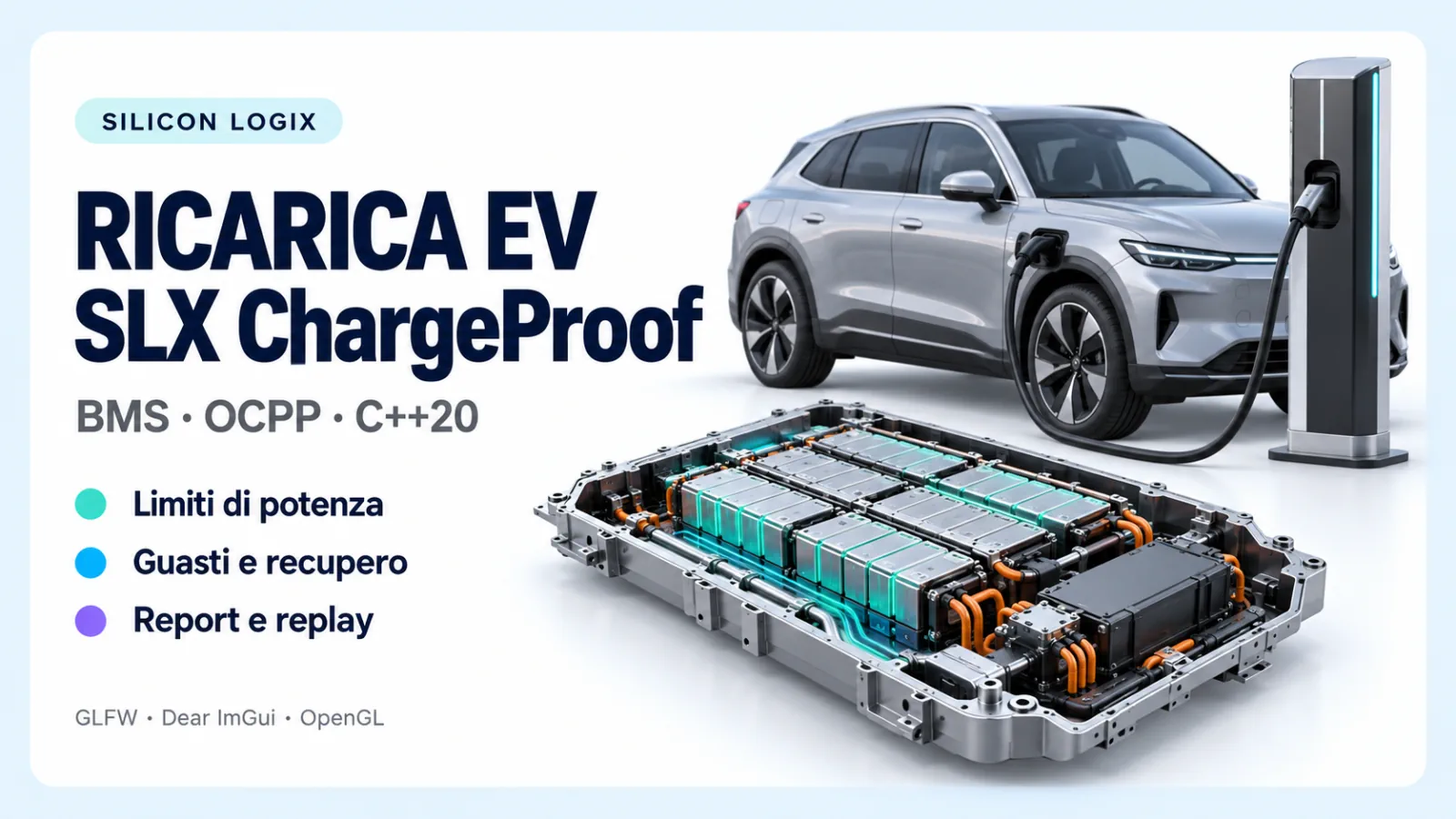
The cover is a generated editorial illustration; the three figures in the article are actual screenshots of the preview.
- DOE / AFDC — Electric Vehicle Charging Stations: infrastructure and factors affecting charging time.
- Texas Instruments — EV/EVSE communication and architecture: AC/DC conversion and vehicle-station communication.
- Open Charge Alliance — Open Charge Point Protocol: OCPP roles and versions.
- CharIN — CCS, Plug & Charge and MCS: charging interfaces and interoperability.
- ISO 15118-20:2022 and Amd 1:2026: second-generation communication and additional services.
- DOE — Extreme Fast Charging Technology Gap Assessment: physical and thermal challenges of fast charging.
- PyBaMM — Thevenin Model: a reference for the equivalent-circuit model family, not a program dependency.
- GLFW and Dear ImGui: libraries used by the native desktop.
- ChargeProof model, protocol coverage and preview validation: the project’s documented formulation, assumptions and checks.