SLX Router: professional Debian router for business firewalls, VPN and VLANs

Solutions Hub · Internal · Networking / Cybersecurity / PMI / IoT-OT

SLX Router: professional Debian router for business firewalls, VPN and VLANs

Software router platform for turning compact hardware into a business firewall with web dashboard, VPN, VLANs, security, reporting and controlled maintenance.

Sector: Networking / Cybersecurity / PMI / IoT-OT Role: Architettura software, dashboard web, firewall, VPN, VLAN, sicurezza rete e manutenzione Published: Jul 5, 2026
  • Debian
  • Linux networking
  • nftables
  • WireGuard
  • VLAN
  • DHCP
  • DNS
  • NAT
  • QoS
  • CrowdSec
  • Web dashboard
  • Mini PC x86

SLX Router: a professional Debian router and business firewall

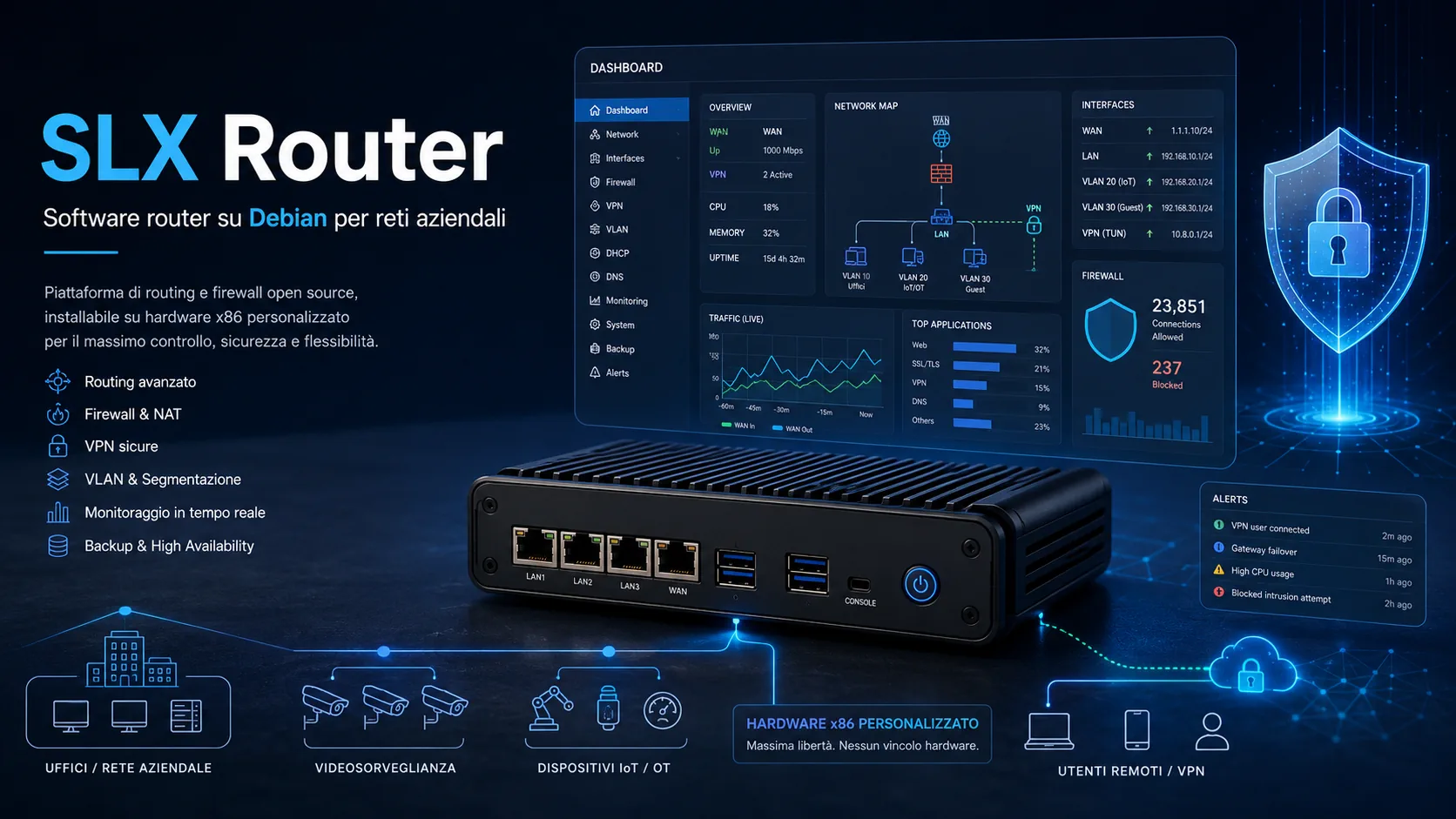
SLX Router is a Silicon LogiX software platform designed to turn compact PCs, mini PCs or dedicated hardware into a professional router and business firewall. It is based on Debian and includes a web dashboard for Internet, LAN, DHCP, DNS, firewall, NAT, VPN, VLAN, QoS, backup, updates, security and reporting.

The project addresses a common business problem. Many networks start simple and then grow around new devices: IP cameras, NAS units, printers, IoT gateways, remote users, cloud services, PLCs or HMIs. Once the network becomes part of daily operations, a consumer router or an undocumented appliance is no longer enough. The company needs segmentation, visibility, clear rules, configuration backup and practical maintenance tools.

SLX Router brings these capabilities into a single software router platform. It is built to make business networks easier to control, reduce manual intervention, simplify technical support and make network security understandable beyond the team that normally works with routing and firewalls.

Debian router architecture: flexibility without a closed appliance

A Debian router provides an updateable and documented Linux base that can be adapted to the hardware selected for the installation. This matters when a business needs multiple network interfaces, 2.5GbE ports, fanless appliances, separate network zones, support VPN access, CCTV networks or IoT/OT segments.

The software layer is separated from the hardware. Firewall rules, the dashboard, VPN profiles, VLAN profiles, backup logic and security features can evolve over time without necessarily replacing the whole device. For business infrastructure this reduces lock-in, improves maintainability and makes it easier to keep configurations consistent across different sites or managed customers.

The architecture follows a practical principle: enable only what the network actually needs. Heavy services can remain disabled until required, logs can be handled in a lighter way, and advanced modules can be introduced gradually according to the operational context.

Web dashboard: fewer mistakes and clearer operations

The dashboard is the operational center of SLX Router. In a business firewall, the interface is not just a convenience feature: a wrong rule, an unnecessary exposed port or a poorly configured VPN can create real risk. SLX Router separates customer, advanced and technical areas to keep daily operations clear.

The customer area shows connection status, connected devices, important alerts and useful network information without exposing sensitive settings. The advanced area manages WAN, LAN, DHCP, DNS, NAT, port forwarding, VLANs, VPN and QoS. The technical area brings together maintenance, backups, diagnostics, logs, updates and temporary support access.

Popups and guided flows help change parameters without dense and confusing screens. The benefit is practical: customers can understand what is happening, while technicians work in a more repeatable and less error-prone way.

Complete network setup: WAN, LAN, DHCP, DNS, PPPoE and fiber scenarios

A router for SMBs must adapt to different Internet lines and network layouts. SLX Router can manage the WAN interface, the LAN interface or the port connected to the switch, static or dynamic addressing, PPPoE, provider VLANs and provider or business DNS settings. This is useful with fiber ONT scenarios, bridged ISP routers, existing networks or gradual replacement of the previous appliance.

DHCP and DNS are not secondary details. They define how devices enter the network, how they are identified and which services they can reach. In SLX Router they become part of business network management: consistent assignments, readable names, secure DNS, per-network separation and better traceability of connected devices.

Physical port management also has operational value. Knowing which interface connects to the Internet, which one goes to the switch and which one serves a technical or CCTV segment avoids ambiguity during installation, audits and support work.

Firewall, NAT, port forwarding, WireGuard VPN, VLANs, multi-WAN and QoS

SLX Router includes the core functions expected from a professional router: firewall, NAT, port forwarding, routing, DHCP, DNS, VLANs, WireGuard VPN, multi-WAN, QoS and physical port management. Each function has a specific role in a business network.

The business firewall decides which communications are allowed and which must be blocked. NAT and port forwarding publish only the services that are actually required, reducing unnecessary exposure to the Internet. Routing controls traffic between networks, while DHCP and DNS make devices manageable and easier to identify.

WireGuard VPN provides encrypted remote access for technicians, employees or maintenance partners without exposing management panels or internal services to the public Internet. QR-code profiles simplify activation on smartphones and laptops, reducing configuration mistakes.

VLANs separate office devices, guest networks, cameras, IoT devices, industrial devices and technical access. This segmentation is essential to limit lateral movement: if a device is compromised or misconfigured, it should not automatically reach the entire network.

Multi-WAN and QoS support continuity and service quality. Multi-WAN helps manage multiple Internet lines or backup connectivity, while QoS gives priority to critical traffic such as VoIP, POS systems, VPNs or business applications.

Business network security: visibility, isolation and faster response

Network security is not only about how many firewall rules exist. It depends on how visible and controllable the network is. SLX Router adds features designed to make unknown devices, abnormal behavior and weak configurations easier to detect.

Automatic quarantine for new devices prevents newly connected hardware from immediately receiving full access to the network. The "isolate device" action lets a technician quickly block a suspicious endpoint, which is useful for compromised PCs, unknown IoT devices or hardware generating unusual traffic.

The automatic network map and mini asset inventory help show what is really connected. This visibility is important for audits, maintenance and reports: without inventory, security remains based on assumptions. A lightweight SIEM-style log engine collects relevant events without requiring a complex enterprise monitoring platform.

Internal canaries and honeypots act as sensors. If a device tries to access resources it should not know about, the router can raise an alert. Lightweight ransomware-behavior detection helps identify early signals such as internal scanning or repeated access attempts to local resources.

Secure business DNS, IP reputation, CrowdSec and IDS/IPS add further control layers. The key point is explanation: an alert should clarify what happened, why it matters and what action is recommended. This makes security usable for SMBs that do not have an internal cybersecurity team.

SMBs and MSPs: network audits, PDF reports, security score, notifications and tickets

For SMBs, SLX Router can become the central point for understanding network status: connected devices, exposed services, active VPN profiles, available backups, main rules, configured VLANs and alerts. This reduces dependence on undocumented knowledge and makes technical decisions easier.

For MSPs, installers and technicians, the platform helps standardize support and reporting. The network audit collects technical data, the PDF report makes it deliverable to the customer, the security score helps prioritize improvements, and email, Telegram or webhook notifications support faster reaction when something important changes.

Temporary technical access avoids leaving permanent credentials active without control. Support tickets connect events with operational requests. The multi-customer dashboard can turn SLX Router into a managed service base: status overview, backups, anomalies, periodic reports and planned maintenance.

NIS2-ready reports do not replace compliance consulting, but they help produce useful technical evidence: asset inventory, segmentation measures, backups, access controls, alerts, incidents and security status. For many organizations this is the first step toward a more governable network.

Router for CCTV, IoT and OT: control over specialized devices

IP cameras, NVRs, IoT gateways, PLCs, HMIs and industrial devices have different requirements from office PCs. They often need to communicate with only a few services, not the whole network and not always the Internet. SLX Router includes features dedicated to these environments.

In a CCTV network, VLANs separate cameras and NVRs from the administrative network. The firewall limits remote access and unnecessary communication. The network map makes it easier to detect new cameras, disconnected devices or abnormal behavior.

In IoT/OT environments, SLX Router can recognize traffic such as Modbus TCP, MQTT, HTTP, NTP and DNS, build a mini asset inventory and raise alerts when a PLC, HMI or gateway communicates with unexpected external destinations. Whitelisting specific servers allows industrial devices to stay offline from the wider Internet while keeping the communications they actually need.

The "learn and lock" approach observes the normal behavior of an IoT device and helps turn it into stricter rules. This is useful when the goal is not to block everything immediately, but to move gradually toward a more controlled and documented network.

Maintenance: backup, restore, rollback and controlled updates

A professional router must be maintainable over time. The SLX Router maintenance area handles platform updates, configuration backup and restore, software rollback, protected reset and controlled service restart.

Backup makes it possible to restore a working configuration after a change, hardware failure or migration. Rollback reduces update risk by allowing a previous version to be restored if something does not behave as expected. Protected reset prevents irreversible actions from being executed by mistake.

The deployment package allows SLX Router to be updated without reinstalling Debian. This makes the platform better suited to real installations, where customer configuration must remain stable and interventions must be fast, traceable and repeatable.

System optimization completes the maintenance model: fewer unnecessary services, fewer disk writes, lighter logs and advanced features enabled only when needed. On compact hardware, this supports reliability, support lifetime and predictable operation.

Technical references: zero trust, modern VPNs, Linux firewalling and NIS2

SLX Router follows a direction consistent with modern security architecture: better asset visibility, less implicit trust in the local network, segmentation, access control and technical evidence. NIST SP 800-207 on Zero Trust Architecture describes the shift from static perimeter defenses toward an approach focused on users, assets and resources.

WireGuard provides a modern VPN model based on public keys and cryptokey routing. nftables and Netfilter provide a Linux foundation for packet filtering and classification. In Europe, NIS2 pushes many organizations toward risk-management measures, reporting, supervision and clearer responsibility for cybersecurity.

References: NIST SP 800-207, WireGuard, nftables / Netfilter, NIS2 - European Commission.

When a custom professional router or business firewall makes sense

A solution like SLX Router is useful when a business network can no longer be managed as a single flat LAN. Multiple sites, remote access, CCTV, IoT, OT, VLANs, exposed services, multiple Internet lines or reporting requirements all call for a clearer network architecture.

Silicon LogiX can support network analysis, hardware selection, VLAN design, VPN setup, firewall rules, monitoring, dashboard development, reporting and maintenance. The result is a custom router/firewall platform that is documented and aligned with the way the business actually works.

Need a router/firewall solution for your company?

We can start from an audit of the current network and define a solution for firewalling, VPN, VLANs, CCTV, IoT/OT, reporting and maintenance.

Contact Silicon LogiX for a technical assessment.

Related projects

Back to Solutions Hub