A real dashboard for a virtual process
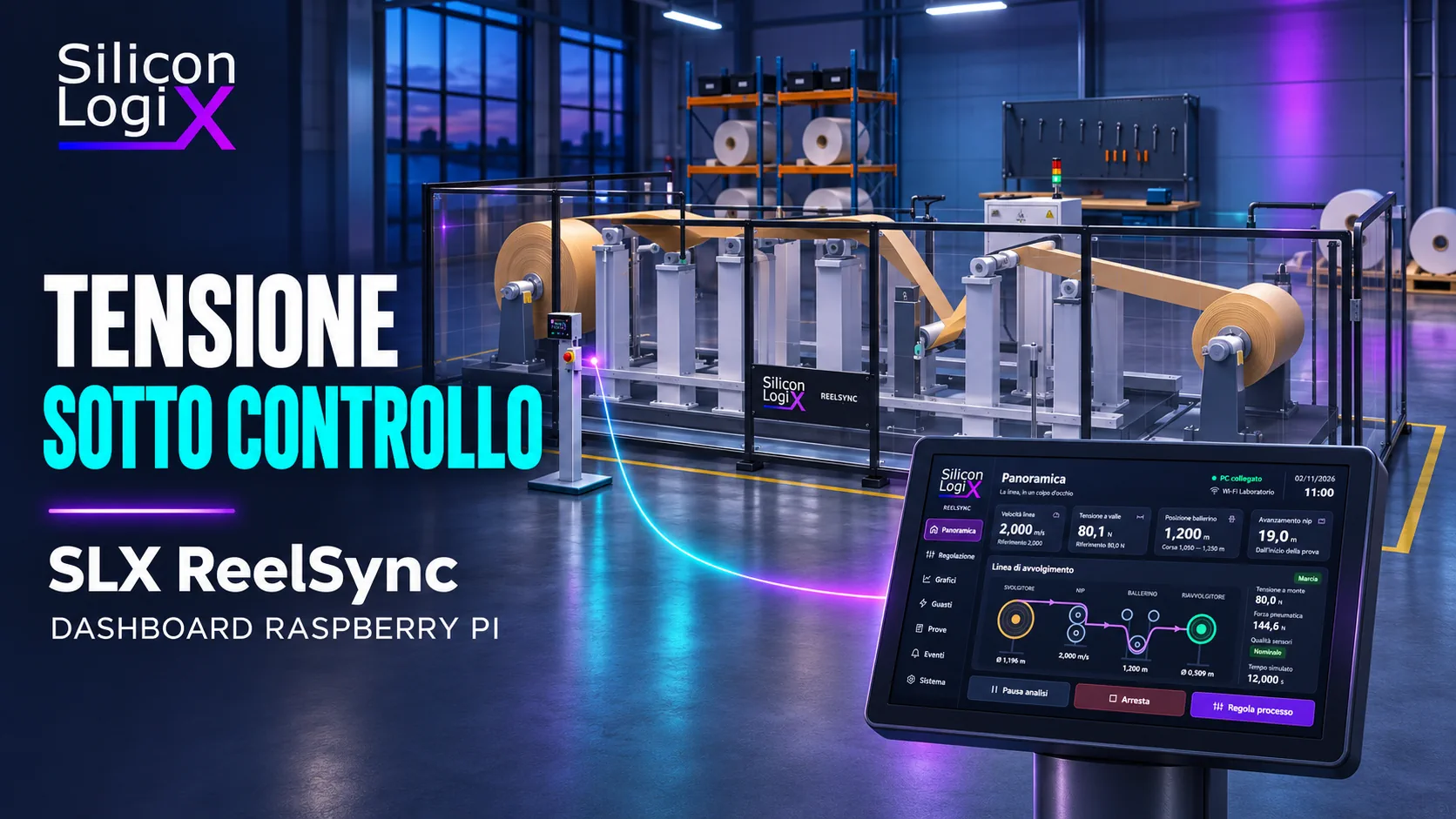
An industrial HMI should help an operator distinguish a valid measurement, a pending command and an alarm that requires attention. SLX ReelSync applies that principle to an unwinding, traction and rewinding line: a Raspberry Pi dashboard communicates over Wi-Fi with a 3D simulator and presents line speed, material tension, reel diameters and dancer position.
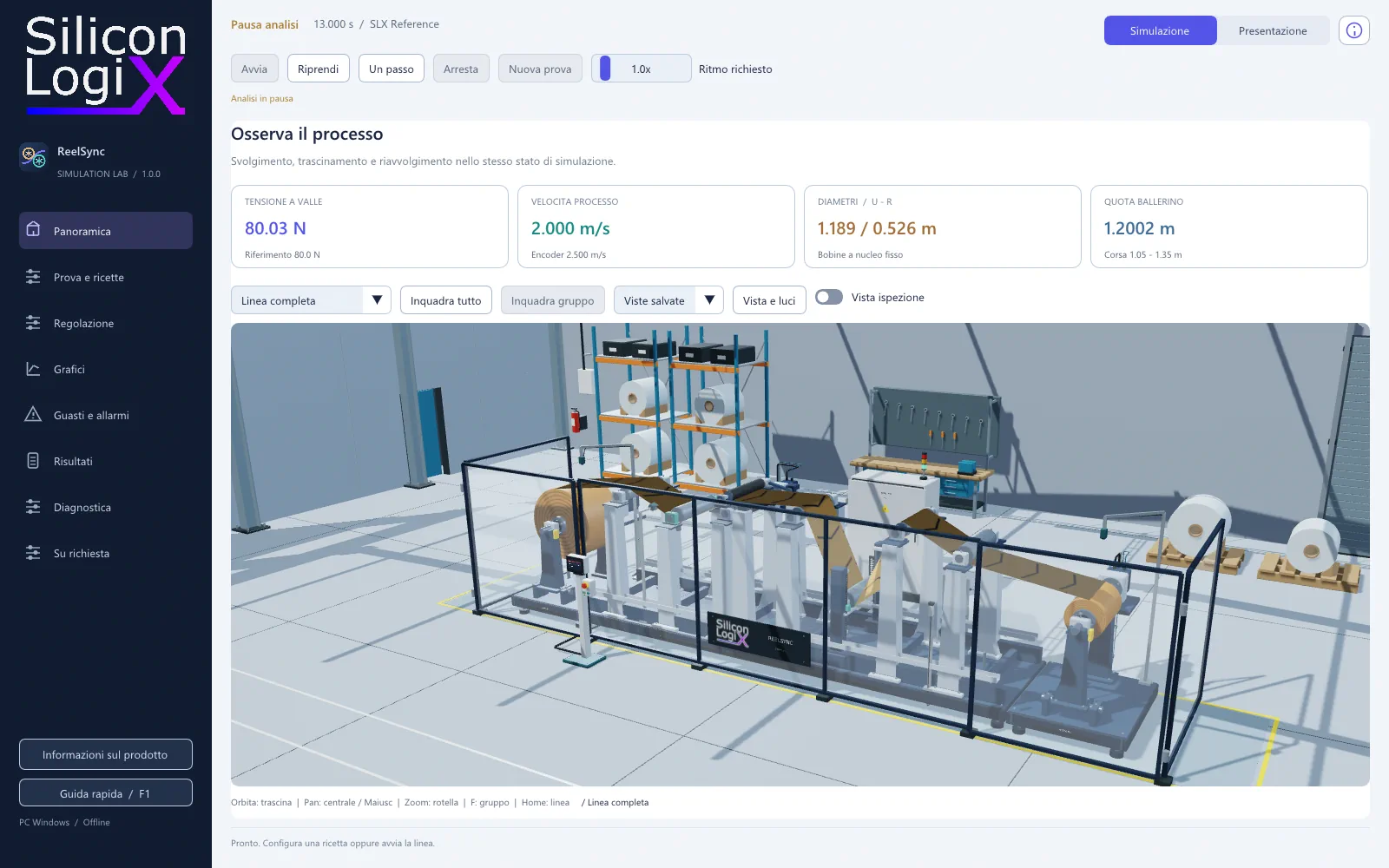
The panel is an embedded device; the line and its sensors are entirely simulated on the PC. The Raspberry Pi runs the operator application and communication service, while the physical model and controller remain in the simulator. This separation supports interface, diagnostics and network testing without requiring a real industrial line.
The companion article, Web tension control: simulated faults with SLX ReelSync, examines the process calculations, sensor errors and test criteria.
Touch interface: process values, references and connection state
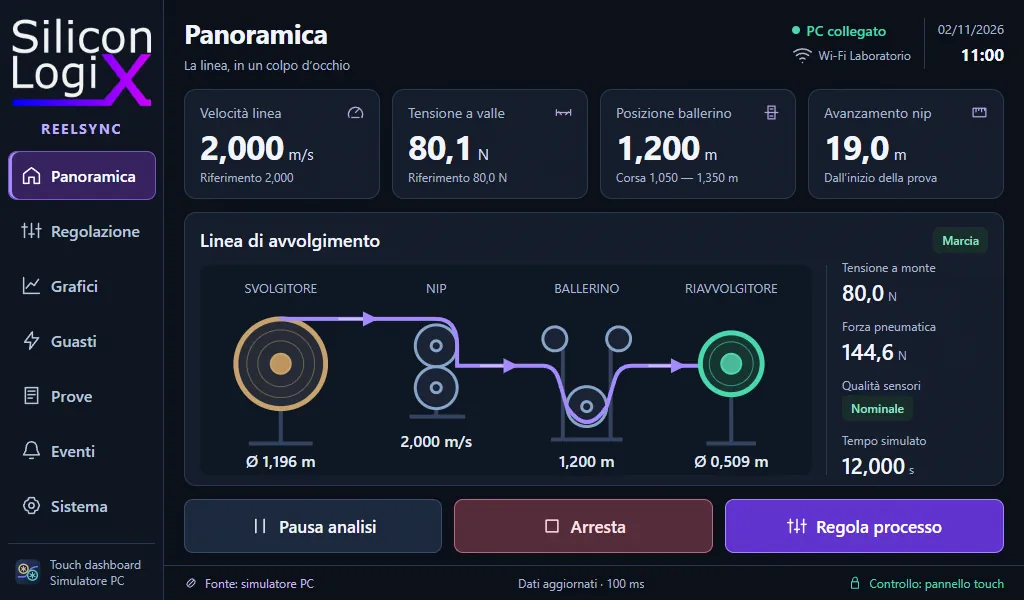
The native GUI uses LVGL 9.5 and a layout designed for 1024 × 600 pixels. The overview combines the main process values with an animated material-path diagram. Roller motion and visual markers on the web make running, stopping and transfer between reels easier to perceive.
Adjustment, charts, events and connection settings have distinct purposes. Values are entered through an on-screen keyboard or numeric keypad; dialogs can be closed, and ordinary operation should not become a sequence of intrusive notifications. Wi-Fi connectivity, connection to the simulator and authority to issue commands are separate states.
The Operator profile prioritises supervision and routine commands. Fault injection belongs to the test laboratory. This distinction brings the panel closer to a machine HMI while retaining the tools needed for demonstrations and diagnostic experiments.
The PC calculates; the panel presents and requests
Process and control
The PC C++ core integrates the model and applies limits, states and permitted commands. The 3D scene, charts and HMI consume the same state.
Application transport
The service manages identities, sessions, telemetry, requests and results. On the Raspberry Pi, it communicates with the GUI through a private Unix socket.
Native HMI
LVGL presents data and submits requests. The dashboard does not run a second, independent copy of the physical model.
Observability
Run identifiers, sequences, events and sensor quality connect an action to its observed effect.
Decoupling these responsibilities prevents a Wi-Fi scan or network wait from blocking rendering. The service receives and validates messages; the GUI updates its objects in the interface context. Design therefore covers page layout as well as timing, queues and transitions.
Embedded Linux on a 512 MB platform
The reference platform is Raspberry Pi 3 Model A+, with a Cortex-A53 processor and 512 MB of RAM. The bench uses its integrated Wi-Fi. Buildroot assembles the embedded system's kernel, filesystem and services; the interface does not require a browser or a general-purpose desktop.
The system separates the base filesystem from persistent data. Network settings, identities and configuration need to survive restarts without turning the boot medium into an undifferentiated working area. Wi-Fi credentials can be entered on the touchscreen or imported using the configuration file provided on the SD card; the completed file is removed after a successful import.
Graphics-buffer sizing, selective object updates and asynchronous network operations matter on this class of hardware. The demonstrator does not claim hard real-time guarantees or machine-safety functions for the panel.
Wi-Fi, pairing and command authority
The local network carries WebSocket over TLS 1.3. Pairing compares the PC identity fingerprint and uses a temporary code, with device confirmation in the simulator. Identities are generated for the installation: the image does not contain private keys shared by every panel.
An authenticated connection starts in read-only mode. The panel requests control and the PC assigns it to a connection; local intervention can revoke that authority. A command includes the run context and an identifier, receives a correlated result and is not treated as executed merely because it was transmitted.
Stale data suspends remote commands. Reconnection resynchronises the state and resumes in read-only mode without automatically resending earlier requests. This behaviour supports coherent supervision; the Wi-Fi channel is not a certified emergency-stop function.
The command lifecycle
| Step | Application check | HMI effect |
|---|---|---|
| Pairing | Identity, fingerprint and temporary code | The device is recognised; read-only access remains distinct from control |
| Control request | PC consent and authority assigned to one connection | Commands become available in a permitted state |
| Submission | Run context, identifier and transport freshness | The request waits for a correlated result |
| Application | Core limits, state and validation | The panel presents the reference and state returned by the process |
| Reconnection | New snapshot and renewed authority | Previous operations are not automatically resent |
Network scanning and Wi-Fi authentication belong to the operating system; TLS identifies the application peer. Local IPC between the service and HMI uses a Unix socket with restricted access. The network contract is specific to ReelSync and is not presented as a universal field protocol.
Contextual alarms and deliberate recovery
Alarms distinguish an active condition, a latched record of a cleared condition and a cause introduced for a test. Colour, symbols and text accompany the indication on both the panel and simulator. The 3D scene highlights the affected component: encoder, load cell, dancer, drives or material path.
Acknowledging an alarm does not remove an active cause. Recovery requires conditions accepted by the core; a material break requires a new run. The countdown allows a fault to be prepared before returning to the overview and observing its development on both devices.
Reels, tension and six material profiles
The virtual line contains two elastic zones, variable-radius reels, a traction nip and a dancer. The catalogue provides PET, LDPE, BOPP, conditioned PA6 and two elastic reference profiles. Recipe properties and dimensions change the response: a tension force in newtons does not, by itself, describe material stress, which also depends on cross-sectional area.
Tests include encoder loss or scale error, load-cell bias or freeze, friction, reduced available drive torque, loss of actuator force, sensor delay and material breakage. An injected cause can produce several consequences; it does not automatically mean that a diagnostic alarm has already been raised.
Repeatable testing and available distribution
Software verification covers the model, material conservation, scenarios, replay, command validation, TLS transport and ARM binaries. The public package can be rebuilt without the core source. Software and emulation tests do not replace validation of a specific combination of board, display, touch input and network.
The Windows 1.5.0 package contains the executable and permitted evaluation material. The embedded dashboard is a separate component; its SD image is not included in the Windows download. The line is a demonstration model, not a model calibrated against a real plant.
From demonstration dashboard to product HMI
The project demonstrates capabilities in firmware development, embedded Linux, embedded graphical interfaces and integration between operator applications and control services. For a real plant, the work starts with I/O, drives, available protocols, update rates and acceptance criteria.
PLC integration, OPC UA or Modbus TCP adapters, application-specific diagnostics, acquisition of real measurements and custom control strategies are project-specific developments. They are not presented as features already implemented in the ReelSync link.
An industrial HMI should make the process verifiable
For an embedded dashboard or simulation bench, a technical enquiry to Silicon LogiX can describe the hardware, signals, protocols and faults to reproduce. These inputs support a development and validation plan suited to the product.
Technical questions
Does ReelSync require a real industrial line?
No. Reels, material, drives and sensors are simulated on the PC. The embedded dashboard communicates with that virtual process to support interface, command and diagnostic testing.
Does the Raspberry Pi run process control?
In ReelSync, the model and controller run on the PC. The Raspberry Pi runs the HMI and communication service. Moving logic to a dedicated controller requires its own architecture and validation.
Does the connection use Modbus TCP or OPC UA?
The described version uses WebSocket over TLS and a ReelSync application contract. Modbus TCP, OPC UA or PLC adapters can be part of custom development, but are not included in the demonstration link.