Project overview
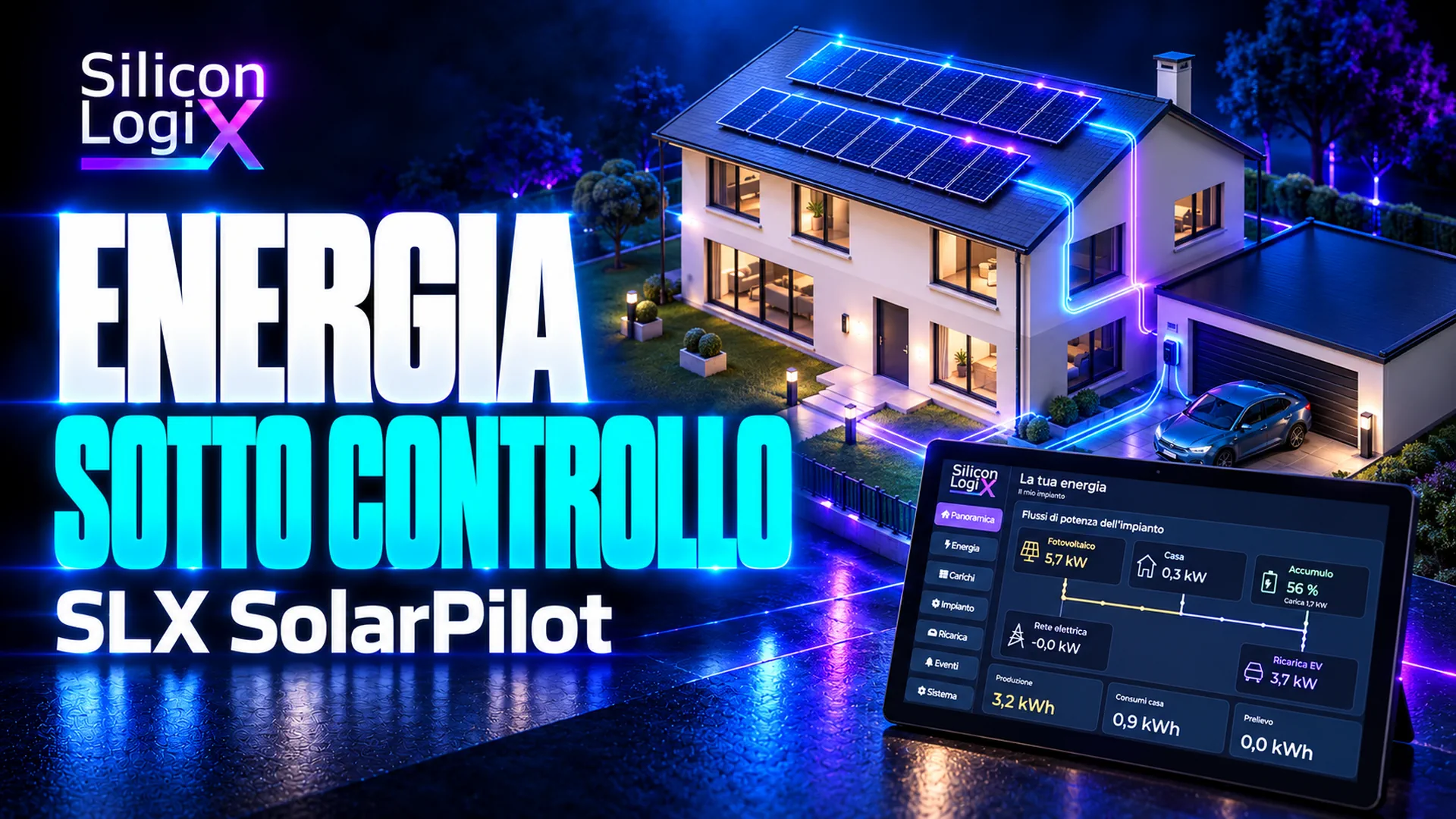
An energy controller must turn measurements, limits and user requests into understandable behaviour. Switching on an oven while an electric car is charging changes grid demand; a passing cloud changes the headroom available for flexible loads and storage. SLX SolarPilot makes this entire chain testable: a touch application, embedded control, communication protocols and a residential plant simulated in 3D.
The project combines a Linux controller with an LVGL interface and a Windows simulator. In the demonstration bench, the PC represents photovoltaic generation, a battery, the home, appliances and an electric vehicle. The controller receives quantities over the network and sends commands that change the model. The connection uses an actual EEBUS stack: the virtual scene reveals the effect of messages, while the embedded software runs on a physical Raspberry Pi.
Power, efficiency and interoperability are examined in Photovoltaics and EV charging: EEBUS and embedded Linux in SLX SolarPilot. The public repository and Windows release 0.4.5 provide access to the demonstrator.
Touch application
The interface is designed for a Hamtysan HDMI touchscreen measuring 10.1 inches, with a resolution of 1024 × 600 pixels. The main navigation remains recognisable throughout use: Overview, Energy, Loads, Plant, Charging, Events and System. Detail screens group parameters and operations without turning the home screen into a permanent configuration panel.
Overview brings together photovoltaic production, household consumption, storage, EV charging and the electricity grid. Animated flows help show where energy is going. Power and state of charge have explicit units and conventions: on the storage screen, negative power means charging and positive power means discharging. This matters when comparing the display, protocol messages and recorded data.
Energy retains consumption context; Loads allows the appliances represented by the bench to be observed and controlled; Plant groups photovoltaic configuration, battery reserve and storage limits. Charging presents vehicle modes and targets. Events and communication status help interpret a result without confusing a fresh measurement with a value left on screen.
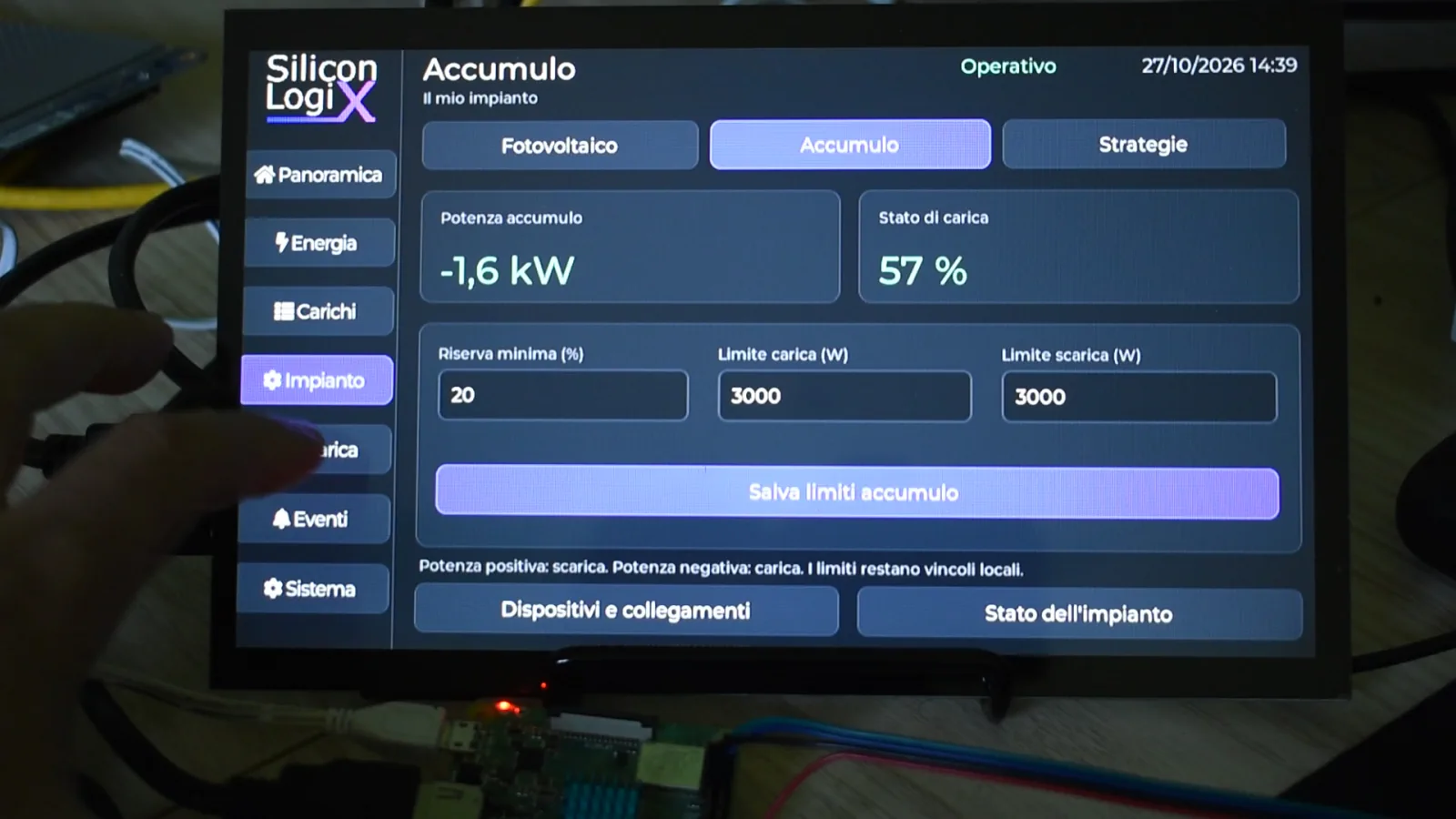
Large controls, press feedback, an on-screen keyboard, confirmations and configuration dialogs are part of the user experience. Asynchronous behaviour also matters: a late Wi-Fi scan result must not replace a page where the user is entering a network manually. Service responses are therefore associated with their request and interface context.
System architecture
The simulator calculates how the plant evolves; the EMS, Energy Management System, chooses how to use available flexibility; the HMI, Human-Machine Interface, presents data and controls. This separation makes each step verifiable: was a command accepted? Did the limit change? Does the resulting power respect the new constraint? Is the display showing the updated state?
Virtual plant
The PC calculates PV generation, storage, loads and EV charging, and makes their effects visible in the 3D home. C++20, OpenGL, Dear ImGui and ImPlot support the model and observation tools.
Embedded control
The EMS service runs strategies, preserves configuration and applies commands to the bench independently of the page being displayed.
Touch application
LVGL presents flows, loads, charging and settings. C/C++ and asynchronous events keep rendering, interaction and network operations separate.
Energy communication
EEBUS SHIP/SPINE carries measurements and commands. SunSpec Modbus TCP paths expose the standard models declared by the simulator.
Embedded control is a service separate from the GUI: it does not require the simulator window to decide every action. During these tests, the PC remains the source of the virtual plant; stopping it interrupts that measurement source. Handling stale data, connection loss and communication recovery is therefore part of validation.
Essential embedded Linux
The selected platform is the Raspberry Pi 3 Model A+, with a Cortex-A53 processor, 512 MB of RAM and built-in Wi-Fi. It provides a useful basis for an application that must use resources carefully. Bench connectivity passes through the Wi-Fi router and does not depend on an Ethernet port on the board.
The distribution uses Buildroot to assemble the toolchain, kernel, filesystem and required services. The project configuration uses Buildroot 2026.08.1, Linux 6.12.61 and a 32-bit ARM environment. Boot proceeds from the Silicon LogiX logo to the application, with an animation that makes loading progress perceptible.
The distribution includes the services needed for operation: control and interface supervision, Wi-Fi authentication, address acquisition, time synchronisation and persistent data management. The system filesystem is read-only; configuration and history use a dedicated data area. This separates distributed software from information that changes during use.
Wi-Fi settings can be entered on the display or imported from a file on the accessible microSD partition. Import validates the fields and transfers configuration to persistent storage; the active setup file is removed after completion. Maintenance also has a serial console with validated application commands, without exposing a shell in the operator interface.
LVGL and 3D visualisation
LVGL provides widgets, events and rendering for embedded interfaces. In SolarPilot it handles pages, buttons, numeric fields, the keyboard and flow visualisation. Updates target changing elements; interaction remains separate from network operations that may take longer.
The video profile uses the platform framebuffer, preserving the HDMI mode qualified with the bench display. The LVGL framebuffer driver documentation describes this path, which draws directly without adding a desktop environment or browser. Performance still depends on resolution, pixel format, update workload and driver configuration: the library name alone is not a measure of smoothness.
On the PC, OpenGL displays the home and its components. Dear ImGui and ImPlot organise controls and charts. The energy model runs through an API separate from the renderer: changing the camera view does not change calculations, while changing a load produces a new electrical state for the interface to represent.
Virtual plant and calculations
The bench includes configurable photovoltaic roof sections, an inverter, storage, household loads and vehicle charging. Time, month, cloud cover and temperature allow different conditions to be explored. Panel nameplate power, inverter limits and battery capacity remain separate parameters: adding modules does not automatically increase every other component.
Appliances also behave over time. A washing machine passes through phases with different power demands; an oven alternates preheating and temperature maintenance; a cycle already running may have a different priority from a new start request. An energy strategy can therefore be discussed in terms of both available power and the service to be completed.
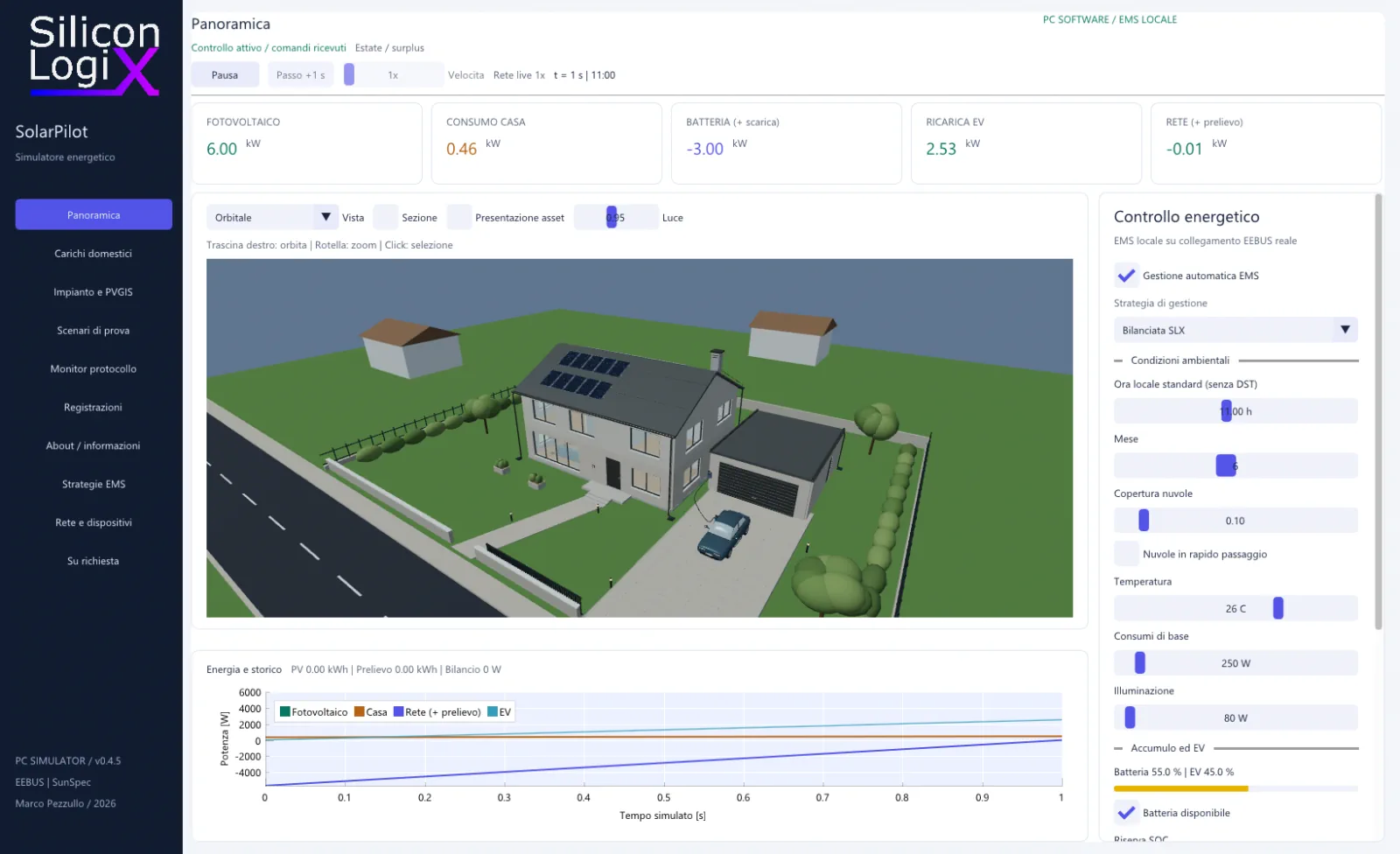
The engine tracks power, energy and state of charge. In the base model, storage has a capacity of 10 kWh and power limits of 3 kW in each direction; declared efficiency is 95% for charging and 95% for discharging. EV charging accounts for capacity, the target and the energy that can actually be transferred within each interval. These figures describe the demonstration configuration, not a particular commercial battery.
Monthly PVGIS references from the Joint Research Centre support comparison with modelled historical yields for Bologna, Rome and Palermo. The software retains the responses and parameters used. These references remain separate from the instantaneous simulation and its synthetic clouds.
Protocols and interoperability
SolarPilot uses two complementary paths: EEBUS SHIP/SPINE for bench energy coordination and SunSpec Modbus TCP for supported device models. Measurement meaning, partner identity and control validity remain explicit. Telegram details are examined in the technical protocol article.
EEBUS: connection, pairing and discovery
The bench uses SHIP 1.0.1 and SPINE 1.3.0 through the Enbility stack in Go. mDNS/DNS-SD discovery of the _ship._tcp service, or a manually configured address, locates the node. TCP, TLS and WebSocket establish the channel; pairing confirms the partner using its retained identity.
SKI, fingerprint and SHIP ID are recorded for the selected peer. An IP address remains a network location, not authorisation. Once connected, the SPINE inventory identifies available entities and features, avoiding assignment of the SLX profile's fixed addresses to a generic device.
From a SPINE message to a change in power
MPC measurements arrive through measurementListData, with scale, unit, timestamp and origin. LPC/LPP limits use loadControlLimitListData. msgCounter and msgCounterReference associate requests with results: an accepted write must then be checked against new model measurements.
The complete profile exposes grid, home, PV, battery, EVSE, washing machine, dishwasher and available PV. The reference controller excludes measurements older than three seconds; the SLX bench monitors command renewal with a local watchdog. These laboratory timings do not implement the complete normative state machines of EEBUS use cases.
SunSpec: declared models, scales and controls
On the server path, Unit IDs 1, 2 and 3 represent PV, meter and storage. The SunS signature and the sequence of block identifiers and lengths allow a client to discover the available models. The server defaults to configurable port 1502; port numbers and unit mappings must not be assumed identical across products.
- Photovoltaics: models 1, 101, 120 and 123; measurements and percentage production limits at implemented points.
- Grid: models 1 and 201; power and imported or exported energy under the declared conventions.
- Storage: models 1, 101, 120 and 124; SOC, charge and discharge limits, and reserve.
Point types, signed scale factors and unavailable-data sentinels are part of decoding. The relationship value = raw × 10^SF prevents confusion between, for example, power quantised to 10 W and the exact physical value calculated by the core. Writing, reading back and observing measurements are separate validation steps.
Application monitoring and compatibility boundaries
The EEBUS monitor observes the SHIP application body at both ends of the stack; it is not a PCAP capture of TLS traffic. It correlates messages, results and plant state. Transmit and receive observations can belong to the same telegram and must not be added as independent traffic.
The optional SLX Energy/1 extension, separate from SunSpec models, adds bench-specific EV functions and washing-cycle permissions. The declared standard PV and storage paths remain usable without adopting it. The ordinary Modbus TCP listener and the secure EEBUS channel have different security properties.
The interoperability matrix, bench EEBUS contract and SunSpec specifications make the scope verifiable. Integrating a commercial device requires commissioning and tests of roles, functions, limits and timing; the demonstrator does not claim certification or universal compatibility.
Interactive tests
A representative test starts with solar surplus. The operator observes flows, changes a charging request and switches on a household load. The connection carries commands; the engine recalculates generation, consumption, storage power and grid exchange. New measurements let the display show the effects of those decisions.
- Start the Windows release and explore Overview with local control.
- When using the controller, configure Wi-Fi and the bench connection, then verify both endpoint identities.
- Set the storage reserve, EV mode and load requests.
- Change one condition at a time: oven activation, cloud cover, evening transition or a power limit.
- Compare measurements, events and the messages actually exchanged.
- Record the session or export data to repeat and discuss the test.
Tests involving external protocols run in real time at 1×. The local laboratory can accelerate scenarios to compare policies. Keeping these two timescales distinct prevents a simulated hour from being mistaken for an hour observing the physical device.
Validation and availability
The public Windows build is also compiled on GitHub Actions. Nine test groups cover energy scenarios, independent numerical oracles, EMS strategies, the asynchronous host and recording, stair geometry, release retention and inter-process communication. The validation documentation describes their scope.
Tests have also run on a physical Raspberry Pi, with an EEBUS connection to the PC and charging changes observed in the model. Later revisions have been accompanied by native and emulated ARM checks. Final product qualification still requires repeated tests on the selected hardware and software revision, field devices and intended operating conditions.
The Windows distribution includes the application, public interface and SDK; the core and protocol service are provided as binaries. Its licence is the Silicon LogiX Evaluation License 1.0. Controller firmware and private sources are not included in that download.
Adapters for specific equipment, operational forecasts, dynamic tariffs, predictive optimisation, multiple plants and dedicated hardware qualification are activities to scope on request. The demonstrator provides a basis for discussing requirements and critical cases without presenting these extensions as already operational.
Custom development includes LVGL HMIs, embedded firmware, desktop software and protocol integration. A technical assessment request can specify the equipment to connect, available interfaces, power constraints, desired behaviour and acceptance criteria.