

Business websites
Identity, content and responsive navigation to present expertise and services.
03 / TECHNICAL AREA
Websites, web applications, portals and dashboards for different users and activities. I can take on development or join your technical department, working with designers, editors and developers. I adapt to the client’s stack, CMS, hosting and review processes.
Platforms and tools follow your context. Some examples:
Skills & technologies
Websites · portals · applications
Content · services · SEOIdentity and contact journeys
Browser · backends · databasesTools for everyday work
Login · roles · documentsCustomers, teams and organisations
Metrics · filters · visualisationsClear data and operations
Updates · checks · hostingWebsite continuity and evolution
The technologies shown are examples.
Engineering support within your team, with shared tools and working methods.
I can support your technical department, work with your design and content team or take on an agreed development scope. I fit into the client’s stack, CMS, hosting and review workflows, working on existing code or new features according to team priorities.
A business website should clearly explain activities and services and guide visitors to the right content or contact. Work covers information architecture, service pages, mobile navigation and content organization. Redesigning an existing site also starts with its published pages and the links that visitors already use.
When the browser becomes a working tool, the project includes application features: customer portals, secure areas, registrations, document management and assistance workflows. Users and permissions are defined alongside available data and operations. Public and private journeys need to remain understandable and consistent for the people using them.
Dashboards and web interfaces can bring together business indicators, process status or device data. Before visual design, we review accessible sources, update frequency, data quality and the decisions the interface needs to support. Integrations with APIs, business systems and IoT devices are scoped to the technical access actually available.
Readability, accessibility and performance guide interface decisions. Structured content and clear links help people and search engines understand a site; images and features should have a defined purpose. Verification covers mobile devices, keyboard navigation, forms and page behavior across different states.
Updates, hosting and maintenance are agreed for the project and its infrastructure responsibilities. Published service URLs are retained; the new areas provide organized entry points to the same content. Projects in this area show existing websites and portals, while articles discuss engineering decisions and the organization of an online presence.
ILLUSTRATIVE ARCHITECTURE
An orientation diagram: components, boundaries and verification are defined for each project.
ENGINEERING SCOPE
Identity, content and responsive navigation to present expertise and services.
Browser-based application features designed around their users.
Access, roles, documents, registrations and assistance workflows.
Operational data, filters and clear visualizations on desktop and mobile.
Updates, operational continuity and planned improvements.
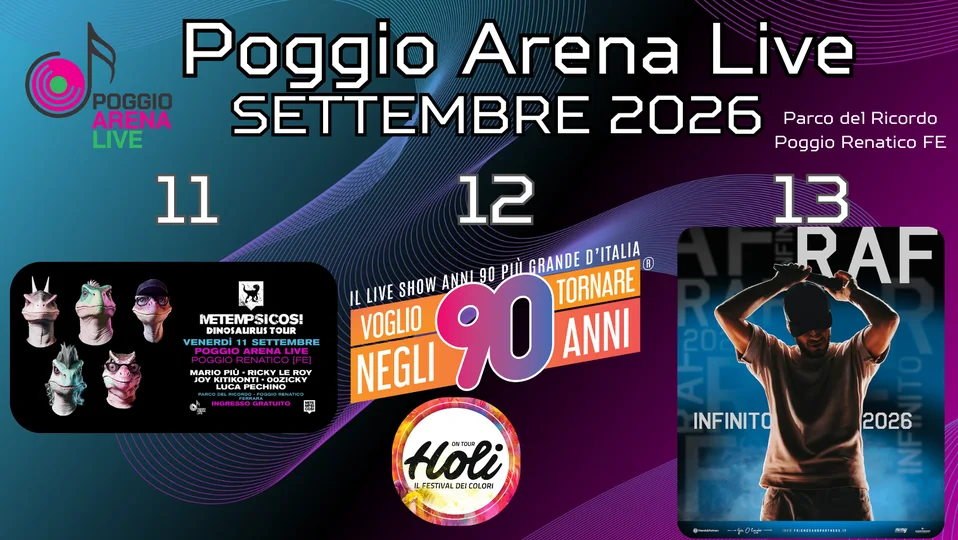
A dedicated event website for Poggio Arena Live with programme sections, event cards, ticket CTAs, sponsor area, FAQs, social sharing and technical SEO.
A custom web portal with CMS, event registration, interactive map, user area, push notifications, live quizzes and advanced admin tools.

SLX AR Lens brings marker-based augmented reality to the browser for products, industry, culture and retail experiences.

Google Search is changing with AI Overviews and AI Mode. For companies, having a website online is no longer enough: pages must be clear, fast and designed to generate real contacts.
THE NEXT STEP